

If you’ve been anywhere near the Salesforce ecosystem recently, you know that Data Cloud is the absolute center of the universe right now. It is the engine powering AI, Agentforce, and the future of personalized customer experiences.
Today, we are going to cut through the jargon. We’re going to break down exactly what Data Cloud is, why businesses desperately need it, and then walk through the complete technical architecture in 7 logical steps.
What is Salesforce Data Cloud and Why is it Required?
In the simplest terms, Salesforce Data Cloud is like a super-fast, giant brain inside Salesforce that catches and organizes information the exact second it happens. It is designed to ingest massive amounts of data from anywhere, clean it up, stitch it together to create a single view of a customer, and then take immediate action on that data.
Why is it required? Let’s look at a classic business problem using a popular retail clothing brand “TrendStyle“
TrendStyle has a beautiful Shopify e-commerce site, physical boutique stores in Mumbai and Delhi, a mobile loyalty app, and a customer support team using Salesforce Service Cloud.
Here is the problem: A customer named Shweta browses ₹5,000 designer jackets on the mobile app. Later, she visits the Mumbai store and buys a ₹1,000 silk scarf. A week later, she messages customer support on WhatsApp regarding a delivery delay.
Because TrendStyle’s systems do not talk to each other, Shweta currently looks like three completely different people to the clothing brand.
- The marketing team blindly emails her a 10% discount for the exact scarf she just bought in-store (wasting margin and annoying Shweta).
- The support agent has no idea she is a high-value customer who just spent hours looking at designer jackets.
This is why Data Cloud is required. It breaks down these siloed databases, connects the dots in real-time, and realizes that the app user, the in-store shopper, and the WhatsApp contact are all the exact same Shweta.
Let’s look at exactly how Data Cloud solves this technically.
The Real-World Scenario: Tracking “Shweta the Shopper”
Imagine you are the Salesforce Architect for “TrendStyle” . Let’s walk Shweta’s data through the core features of Data Cloud:
- Connection & Ingestion: Shweta browses that ₹5,000 designer jacket on her phone. Later, she buys the scarf at the Mumbai store. Data Cloud uses Data Connectors to create a Data Stream that constantly pulls this web tracking and AWS S3 purchase data into the system.
- Data Modification (Prepare & Model): The data comes in messy. Data Cloud cleans this data up and maps it to standard Data Model Objects (DMOs) so the system knows exactly what a “Customer” or a “Sales Order” looks like across all platforms.
- Unification: This is the magic. Through Identity Resolution, Data Cloud looks at the email, phone number, and device IDs, and realizes that “shweta.sharma” and “S. Sharma” are the exact same human being.
- Segmentation: The marketing team uses a drag-and-drop builder to perform Segmentation, creating an audience filter that says: “Find all high-value customers who bought an accessory today, but abandoned designer jackets in their online cart.”
- Activation: The millisecond Shweta falls into this segment, Data Cloud pushes her data out to an Activation Target (like Marketing Cloud). This triggers a personalized WhatsApp message offering a personal styling session, and simultaneously tells Google Ads to stop showing her ads for the scarf she already owns.
Now that we know why we use it, let’s look at how it works under the hood.
Here is the TriggerHours breakdown of the Data Cloud architecture in 7 steps:

More detailed explanation here in below image
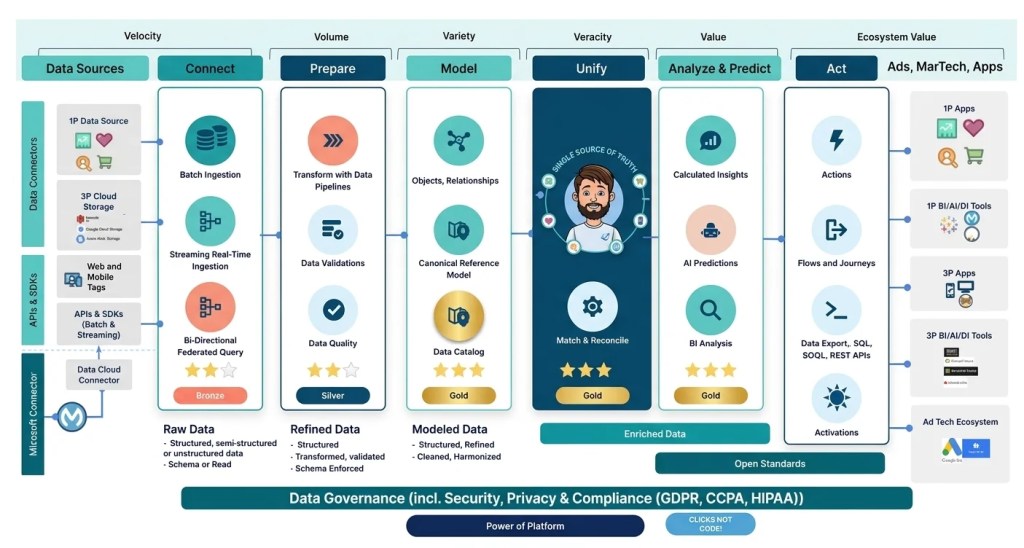
The 7 Steps of Data Cloud Architecture
As you can see in the diagram above, data moves from left to right, transforming from messy “Bronze” raw data into highly valuable “Gold” enriched data. And underlying this entire pipeline is strict Data Governance, ensuring GDPR and local data compliance every step of the way.
Step 1: Data Sources
Before Data Cloud can do anything, we have to identify where our data lives. Your sources might include 1st Party (1P) data like Salesforce CRM, 3rd Party (3P) cloud storage like AWS, Azure, or Google Cloud, web and mobile tracking SDKs, or legacy databases.
Step 2: Connect
This is where ingestion happens using Data Connectors. Salesforce provides pre-built connectors to easily plug into external systems.
When you connect a source, you create a Data Stream. A Data Stream is the actual pipeline that flows data into Data Cloud. Depending on the source, your Data Stream might use Batch Ingestion (like our nightly POS file), Streaming Real-Time Ingestion (like Shweta clicking the jacket).
Tech Note: When data lands here via a Data Stream, it is stored as a raw Data Lake Object (DLO).
Step 3: Prepare
Raw DLO data is rarely ready to use. In this step, we use Data Pipelines to clean things up. This is where we run Data Validations and check for Data Quality. For example, formatting all phone numbers to properly include the +91 country code. The data is now structured and refined .
Step 4: Model
Now that the data is clean, it needs to speak the same language. This is where Data Model Objects (DMOs) come into play.
Data Cloud uses a Canonical Reference Model (the standard Customer 360 Data Model). You take your custom, raw Data Lake Objects (DLOs) and map them to standard DMOs (like Individual, Contact Point Email, or Sales Order). This creates a unified Data Catalog that the system can actually understand, regardless of where the data originated.
Step 5: Unify (Single Source of Truth)
This is the heart of Data Cloud: Identity Resolution.
Identity Resolution uses strict Match Rules (e.g., “Exact Email Match” or “Fuzzy Name Match”) and Reconciliation Rules to find duplicate records across all your mapped DMOs. It takes Shweta’s three different system profiles, links them together, and creates a Unified DMO. Your fragmented data is now officially Enriched Gold data.
Step 6: Analyze & Predict (Segmentation and Value)
Once we have a Unified DMO, we extract business value. Here, we build Calculated Insights (e.g., calculating Shweta’s Lifetime Value or her Engagement Score).
More importantly, this is where Segmentation happens. Marketers use the Segment Builder to filter massive amounts of Unified DMO data in seconds creating highly targeted audiences (like “High-value Mumbai shoppers who like Designer Jackets”) without writing a single line of SQL.
Step 7: Act (Activation )
Data sitting in a database is useless unless you do something with it. The final step is taking your Segments and publishing them.
To do this, you first define an Activation Target. An Activation Target is the literal destination where you want to send your audience data (e.g., Salesforce Marketing Cloud, Amazon S3, Google Ads, or Meta).
Once your Activation Target is set up, you create an Activation, which packages up your Segment and pushes it to that target to drive immediate, personalized revenue.
What’s Next?
Understanding this 7-step high-level architecture and mastering core concepts like Data Streams, DMOs, Identity Resolution, and Activation Targets is the absolute key to passing your Data Cloud Consultant exam and surviving real-world implementations.
But we aren’t stopping here. In our upcoming article series, we are going to do a deep-dive technical guide on every single one of these 7 steps. We will show you exactly how to build Data Streams, map DLOs to DMOs, and configure Identity Resolution rules natively inside Salesforce.
Author

Discover more from Trigger Hours
Subscribe to get the latest posts sent to your email.